Friday, April 2, 2010

The real iPad breakthrough: as a spoke, not a hub

And it's a spoke of genius, pardon the pun.
My iPad is due to arrive in about 30 hours. Apple's embargo on reviews ended the evening of March 31st, most of them are favorable.
But there are still whiney blogs out there. "What? No USB?" "What? It won't shine my shoes?"
These people just don't get it.
Here's the real deal: as the NYT's David Pogue has pointed out, the iPad is going to be a profound game-changer in consuming content. It's not so much about creating content.
Though I'll have the iPad keyboard dock, that'll be mostly for light iWork and email. Primarily, the iPad will be the web browser I've always wanted to have with me everywhere in the house at all times when I'm away from our other three Macs.
And its magnificent screen is so liberating that it'll really make me dip into electronic books and periodicals.
But for major work and heavy-duty applications, that's why my G5 tower, 30-inch screen, and extended color-coded keyboard exist. With a terabyte of storage and another TB of backup, that's where all my writing, photos, videos, and web content will be managed and manipulated. Afterwards, syncing what I want onto the iPad swill be as painless as my iPhone.
The device's only serious lack is Flash. If HTML5 can't fill that void, you can be sure a subsequent OS update will take care of the problem.
I'll post my first review within 48 hours. It'll be floating out there with about 10,000 others.

Sunday, March 28, 2010

The genius of Buster Keaton

Tonight TCM played "Sherlock Jr." starring and directed by Buster Keaton.
It is one of my favorite silents, marked by his technical wizardry (with lots of in-camera effects), wit, acrobatic ability, unbelievably nervy stunts,* and flawless timing.
In one segment, he even does exceedingly difficult bank shots that would be the envy of most pool sharks.
IMHO this 42-minute gem is superior to most of the revered Chaplin films.
Only Harold Lloyd was in his class. Lloyd fortunately made a lot of money, though not as much as Chaplin, and re-emerged from retirement to make some successful sound films.
Keaton's career was ruined by a disastrous MGM studio deal that took away his creative control. Aside from what is essentially a cameo appearance in "Sunset Boulevard," about the only time the postwar public got to see him was in Ford van commercials from the early sixties. (See Youtube video link below.)
His masterpiece is "The General," which I first saw in Paris, of all places. (The French's devotion to Jerry Lewis notwithstanding, they do appreciate great cinematic art.)
* In one of the incredible stunts, he actually fractured his neck — although it wasn't diagnosed until years later.
http://www.imdb.com/name/nm0000036/
http://www.youtube.com/watch?v=zhMmqdiEt10

Saturday, December 12, 2009

Apple Safari team, take note!

Safari is a fine browser, but has one irksome failing: When you quit and relaunch Safari, none of the previously-open pages relaunch. (Unlike Apple Mail, for example.)
Yes, you can go to History and "open all previous windows." But this is an unnecessarily irritating step.
And if you should relaunch Safari and subsequently open a few new windows, and then have to quit for some reason, only those last few windows will be re-open using that command.
To get all your previous windows open, you will have to ploddingly go and re-open every one of them individually through the History window.
I know it's not good practice, but since I have tons of RAM, I often have two dozen or more windows open. Sort of having lots of papers on my desk.
What I'm asking for is not rocket science. Omniweb, for example, does this automatically.
Apple, are you listening?
Probably not.

Tuesday, December 8, 2009

EPA Decision 'Obligates' Action on Greenhouse Gases

A note sent to a meat-loving friend:
Obama doesn't need legislation now. His EPA enforcers will be free to run amok.
And wait till they start dealing with all those flatulent cows!
Either the taxes will be passed on, raising your meat prices, or frustrated farmers will kill them off, so you might profit from a bumper crop of steaks.
I'd suggest you install a big walk-in freezer in your house either way. I'm sure Al Gore has one.

Monday, December 7, 2009

Obama's transparency

You can't make this stuff up:
Today the Obama administration had a meeting on openness, which was closed to the public.
If you wrote this in a book, it would be judged as bizarre comedy and a rip-off of Catch-22. But such flagrant flouting of steely campaign promises is quite routine in this administration, as this AP article notes:
One can't help but be reminded of Clinton's promise to "be the most ethical administration ever."
If someday a candidate promised to do business as usual and be duplicitous whenever it was convenient, maybe we'd actually get a President that we could have faith in.

Sunday, December 6, 2009

Type expander utilities compared.

I spent a lot of time evaluating type expander applications. I meticulously went through six or eight, most of which were marginal. Here's my shootout result, in case you don't want to reinvent the wheel.

It finally came down to Typinator and TextExpander. I paid for both, and would recommend only the latter if I’d researched even more. (One major squawk: Typinator wants you to pay a separate fee for every single household Mac you have.)

I find the interface of TextExpander much more pleasing, and its capabilities superior. Here’s a feature comparison:

http://www.smileonmymac.com/TextExpander/compare.html

But since I paid for both of them, I have them both active. So how do I keep them from conflicting with each other? (This is a problem if you’re not careful.)

Basically, I let Typinator do auto-corrections of spelling, using their libraries.

But I use TextExpander for critical, graphical, and most of my custom expansions.

Apple has a system-wide spell checker, but less comprehensive and transparent than Microsoft’s. (A countervailing benefit is that it works almost everywhere, including web page forms, not just in MS apps.)

Not surprisingly, I like it better when these words can be auto-corrected. Unfortunately, Typinator auto-corrects only when you misspell a word in one of the ways it expects. (If this sounds somewhat irrational, it is; and it limits its usability.)

As my separation of powers, besides using TextExpander for most of my custom expansions, I was absolutely blown away when they added libraries for diacritical marks.

(I’m one of those purists who want words like naïve or bête noire marked correctly. I can never remember keyboard commands to insert diacriticals, even when I remember what they’re supposed to be.

I assign different sounds to each of the applications so I know where the correction is coming from. But that’s probably far more anal-retentive than most people would be.

One of these utilities will become a "must-have" once you get used to it.

Saturday, December 5, 2009

Assignment for the Apple Mail team.

After many years of devoted use, I dumped Microsoft Entourage after it managed to lose months’ worth of emails.

And I switched to Apple Mail. It’s a great time saver in the way it tightly integrates address book, iCal, and allows painless downloading attachments to iPhoto.

(Entourage integrates with other Office products, but only in their little walled garden of Microsoft monopoly.)

However:

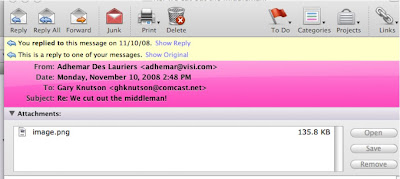
1) We desperately need a way to color-code a recipient without jumping through the hoops of adding it to a "rule." Entourage has made this absurdly simple for years. It's one of the most important things I miss, and consider it a major drawback of Apple Mail.

For example, when I get un-categorized emails, I usually want to add the sender to my various color lists for friends, work, politics, technology, or whatever. This way, one can scan subsequent incoming messages and separate the wheat from the chaff. (Especially important if you get five dozen new messages a day, as I do.)

To do this with Apple Mail using Rules is an irritating, confusing two-minute job — so most of the time, you don't do it.

With Entourage, it’s a matter of just clicking the “categories” pane at the top.

2) Though Apple emails that you've forwarded have an arrow next to them in the message pane, if these or other messages are sitting open on the desktop (and I often have dozens of like this), there's nothing on them to show their status.

Look at the illustration to see how Entourage elegantly handles these needs.

Apple, is there some reason your programmers can’t manage to adopt these crucial features?